


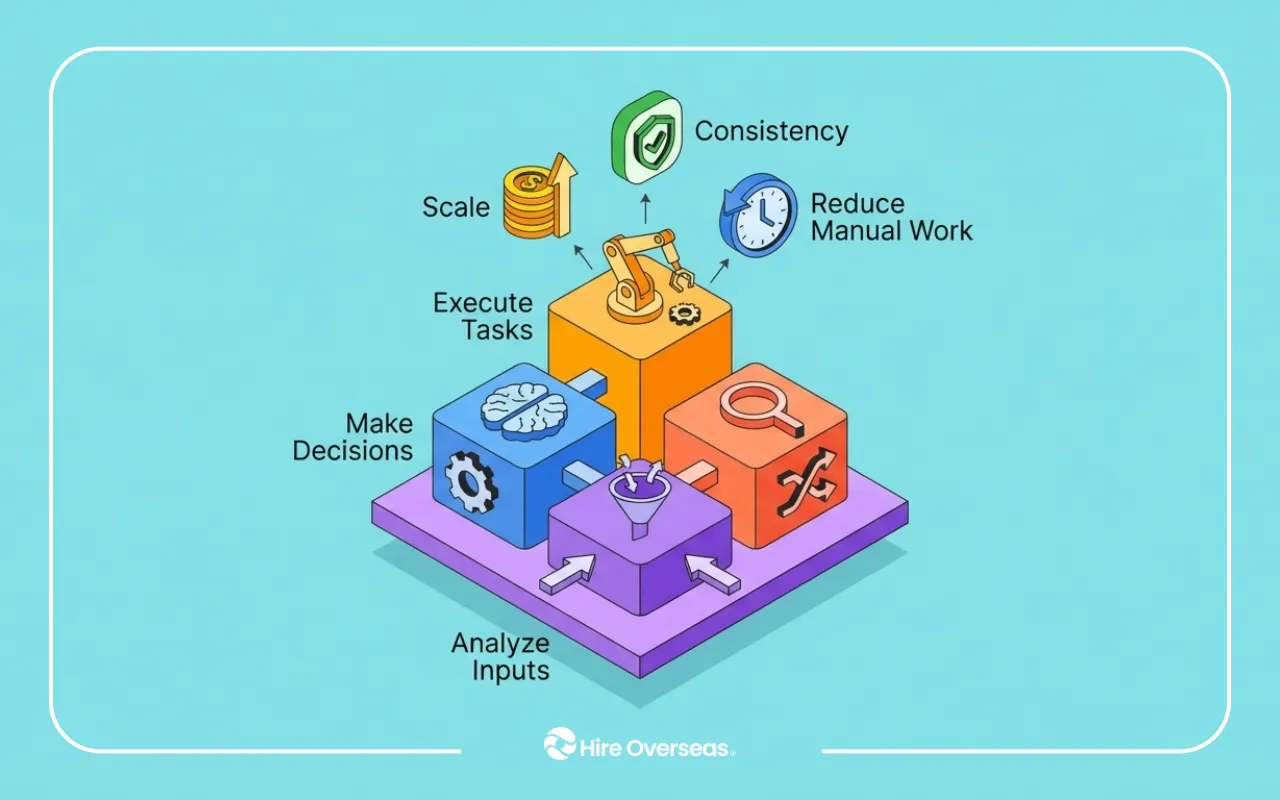
AI automation for business is no longer experimental. It is becoming core infrastructure for how companies operate, scale, and compete.
What started as simple AI tools has evolved into AI powered workflow automation systems that can analyze data, make decisions, and execute tasks across multiple platforms.
At Hire Overseas, we are seeing a clear shift. Businesses are no longer asking what AI can do. They are asking:
How do we automate real business processes end-to-end?
What Is AI Automation for Business and How It Works
AI automation for business refers to combining artificial intelligence, workflow automation, and system integrations to execute operational processes automatically across tools.
Unlike rule-based automation, AI systems are not limited to predefined instructions. They can:
- interpret incoming data from different sources
- analyze context instead of just matching rules
- make decisions within defined logic
- execute workflows across multiple platforms
This enables artificial intelligence business process automation that adapts to real-world conditions, especially in workflows that involve multiple systems or variable inputs.
Instead of requiring human intervention at each step, AI automation allows processes to move forward continuously once triggered.
Core Components of AI Automation Systems
Most AI automation for business processes rely on three key layers working together.
AI Models or Agents
This is the intelligence layer of the system.
AI models or agents are responsible for:
- interpreting inputs such as text, data, or events
- classifying and extracting relevant information
- making decisions based on predefined logic or context
For example, an AI agent can determine whether a lead is qualified, categorize a support request, or generate a report summary.
This is what enables automated decision making using AI.
Workflow Automation Systems
This is the execution layer.
Workflow systems take the output from the AI and carry out actions such as:
- updating records in a CRM
- sending notifications or emails
- triggering the next step in a process
- coordinating multi-step workflows across tools
Without this layer, AI would only generate outputs but not act on them.
This is what enables AI powered workflow automation systems.
System Integrations
This is the connection layer that allows everything to work together.
Integrations link AI and workflows to the actual tools businesses use, including:
- CRM platforms
- marketing tools
- internal databases
- communication systems
They ensure data flows correctly between systems and that actions happen in the right place.
This enables:
- integrating business systems using OpenClaw or similar frameworks
- connecting APIs across business platforms
- seamless cross-platform automation
How These Components Work Together
These three layers operate as a single system:
- AI analyzes and decides
- workflows execute actions
- integrations connect everything across platforms
Together, they create systems capable of autonomous task execution with AI, where processes run continuously without manual coordination.
This is what turns AI from a tool into an operational system.
Why Businesses Are Adopting AI Automation for Business Operations
Most companies are not limited by strategy. They are limited by operations.
Teams spend a significant amount of time on repetitive coordination tasks that keep the business running but do not directly drive growth.
Common examples include:
- updating systems across tools
- compiling reports manually
- routing internal requests
- tracking performance metrics
- responding to routine customer inquiries
These processes are necessary, but they create operational drag.
What AI Automation Improves
AI automation addresses these inefficiencies by removing the need for constant manual intervention.
It enables businesses to:
- eliminate manual operational tasks that slow execution
- reduce repetitive workflow processes across teams
- streamline internal business operations across systems
- improve team productivity with automation
Instead of employees managing processes step by step, systems handle execution automatically.
This leads to AI enabled operational efficiency, where workflows run continuously and consistently.
The Shift Toward Intelligent Automation
What we are seeing at Hire Overseas is not just more automation, but smarter automation.
Businesses are moving toward:
- intelligent automation for business operations
- enterprise AI workflow automation across departments
- automated decision making using AI within workflows
This shift changes the role of AI.
It is no longer just assisting employees. It is becoming part of the operational infrastructure that runs the business.
As a result, companies can operate faster, reduce errors, and scale without increasing complexity.
If you're still identifying which workflows in your business are actually worth automating before building anything, this guide on how to implement AI in your business walks through how startups find their highest-impact processes first — and why starting with tools instead of operational bottlenecks is the most common reason AI implementations stall.
How AI Workflow Automation Systems Operate in Real Business Processes
AI automation systems follow a structured flow. Understanding how they operate helps businesses identify where automation creates the most value and how different components work together in real scenarios.
Step 1: Workflow Trigger or Input
Every automation begins with a trigger that initiates the workflow.
This can come from:
- a new lead entering a CRM
- a customer submitting a support request
- a scheduled reporting time
- a system event or API call
- a form submission or data update
AI automation systems continuously monitor these inputs in real time.
Once a trigger is detected, the workflow starts automatically without requiring manual initiation. This ensures processes begin immediately instead of waiting for human action.
Step 2: AI Processing and Decision-Making
After the trigger, the AI layer processes the incoming data.
At this stage, the system adds intelligence by:
- classifying or categorizing inputs
- extracting key information from structured or unstructured data
- evaluating conditions based on business logic
- generating outputs such as summaries, responses, or recommendations
This is where machine learning driven task automation becomes valuable.
Unlike traditional automation, the system does not just follow fixed rules. It can interpret context and make decisions based on the situation, which allows it to handle more complex and variable workflows.
Step 3: Workflow Execution Across Systems
Once the AI determines what needs to happen, the workflow automation layer executes the required actions.
This may include:
- updating records in a CRM or internal database
- sending notifications via Slack, email, or messaging tools
- triggering follow-ups, tasks, or sequences
- generating reports or documents
At this stage, the system moves from decision to execution.
This enables task automation using AI agents, where workflows continue automatically across multiple steps without requiring human coordination between each action.
If your concern is less about the automation itself and more about whether a distributed team can actually run and monitor AI workflows reliably across time zones, this breakdown of leveraging AI with overseas teams explains how companies combine offshore operators with automation systems to keep workflows running consistently without adding internal overhead.
Step 4: Integration Across Business Platforms
The final layer ensures that all actions happen inside the tools businesses already use.
The system interacts directly with:
- CRM platforms
- analytics dashboards
- communication tools
- internal databases and SaaS applications
This integration layer is critical because it allows automation to operate within real business environments, not as a separate system.
It enables:
- connecting APIs across business platforms
- synchronizing data between systems
- ensuring actions are executed in the correct tools
This is what makes integrating business systems using AI effective at scale.
Why This Matters for Businesses
When these four steps work together, they create a continuous execution system.
Instead of:
- workflows stopping after each step
- teams manually moving processes forward
the system:
- processes inputs
- makes decisions
- executes actions
- updates systems
all in a continuous loop.
This allows businesses to move from manual coordination to automated execution.
The result is more consistent operations, faster execution, and the ability to scale workflows without increasing operational complexity.
Types of AI Tools and AI Agents for Business Automation
AI automation for business is powered by different types of tools. Most companies do not rely on a single platform. Instead, they combine multiple tools depending on the complexity of their workflows.
Understanding these categories helps businesses choose the right stack for their needs.
Generative AI for Business Automation
Generative AI tools focus on creating outputs within workflows.
These tools are commonly used for:
- generating reports and summaries
- drafting emails and communications
- creating documents and content
- performing automated research
Popular tools include:
These support:
- generative AI workflow automation systems
- automated research using generative AI
- AI powered document creation workflows
- generative AI business task automation
When integrated into workflows, generative AI handles the thinking and content layer before passing outputs to execution systems.
AI Workflow Automation Platforms
These platforms act as the execution layer of automation.
They connect different tools and ensure workflows move across systems.
Popular platforms include:
- Zapier for simple, rule-based automations
- Make (Integromat) for advanced, multi-step workflows
- n8n for flexible, developer-friendly automation
- Workato for enterprise-level integrations
They enable:
- automating SaaS platform integrations
- connecting APIs across business platforms
- cross system automation orchestration
When combined with AI, these become powerful AI automation tools for business that handle both logic and execution.
AI Agents for Business Automation
AI agents represent the most advanced form of automation.
Unlike traditional workflows, agents can:
- plan tasks
- adapt to new inputs
- execute multi-step processes dynamically
Examples include:
- OpenClaw for autonomous workflow execution across systems
- LangChain for building custom AI agent pipelines
- CrewAI for multi-agent collaboration
- AutoGPT-style agents for task-based automation
These tools enable:
- AI agents for business workflows
- autonomous AI agents for operations
- agent based workflow automation
- multi agent workflow automation systems
This is where businesses achieve autonomous task execution with AI, where systems operate with minimal human intervention.
Best AI Tools for Business Automation (Comparison Table)
How Businesses Combine These Tools
In practice, businesses build layered systems.
A typical setup includes:
- generative AI (ChatGPT or Claude) for reasoning and outputs
- workflow tools (Make or Zapier) for execution
- AI agents (OpenClaw or LangChain) for orchestration
This combination enables:
- AI agents managing business tasks
- unified automation across tools
- scalable AI automation for business processes
Instead of using isolated tools, companies build systems where each layer plays a role in execution.
If you're weighing how much of your operations AI can fully handle versus where you still need people making judgment calls, this breakdown of whether AI can replace outsourced workers explains where automation reliably takes over, where human oversight stays essential, and how the companies scaling fastest are combining both rather than choosing between them.
Hire Overseas Insider: How to Use AI for Business Automation Successfully
At Hire Overseas, we have seen a clear pattern.
Companies that succeed with AI automation do not start with tools. They start with how their operations actually work.
The difference is not access to AI. It is how workflows are designed, connected, and executed.
1. Start With Operational Bottlenecks, Not AI Tools
Most companies begin by exploring tools.
But the better approach is identifying where operations slow down.
From our experience, the best automation opportunities come from:
- workflows that require constant coordination
- repetitive processes across multiple systems
- tasks that depend on manual follow-ups
This is where AI automation creates immediate impact.
2. Build Systems, Not Isolated Automations
One of the most common mistakes we see is building disconnected automations.
These may work individually, but they do not scale.
Successful companies focus on:
- connecting automated business processes
- building cross system automation orchestration
- creating unified automation across SaaS tools
This turns automation into an operational system, not just a set of tasks.
3. Combine AI, Workflows, and Integrations Properly
AI alone is not enough.
From what we see, effective automation always combines:
- generative AI for reasoning and outputs
- workflow systems for execution
- integrations for connecting tools
This creates AI powered workflow automation systems that can run end-to-end processes.
4. Design for Real-World Conditions
Automation rarely fails in testing. It fails in production.
This happens when workflows do not account for:
- incomplete or inconsistent data
- unexpected inputs
- system errors or downtime
At Hire Overseas, we emphasize building systems that handle these scenarios from the start.
5. Focus on Execution Reliability, Not Just Speed
Many companies prioritize speed when implementing AI.
But reliability is what determines long-term success.
- Strong automation systems:
- execute consistently
- recover from errors
- maintain data accuracy across platforms
This is what enables AI automation for business processes to scale.
Example: Automating Customer Support Ticket Handling Across Systems
One Hire Overseas client in eCommerce was managing a high volume of customer support tickets across email and chat.
Their process looked like this:
- tickets were received through multiple channels
- agents manually read and categorized each request
- responses were drafted individually
- CRM and helpdesk systems were updated manually
- complex issues were escalated without full context
Even with AI tools, the workflow was still heavily manual and inconsistent.
After restructuring the process, an AI automation system was implemented:
- incoming tickets are automatically classified by type and urgency
- AI generates responses for common inquiries such as order status or returns
- the system updates CRM and helpdesk records instantly
- complex tickets are routed to the correct agent with full customer context
- notifications are triggered for priority cases
This created a fully connected workflow across support tools.
Result:
- reduced response time across channels
- eliminated repetitive support tasks
- improved consistency in customer communication
- allowed support teams to focus on complex issues
This is a clear example of AI agents managing business tasks within real operations.
AI Automation for Business Is About Execution, Not Tools
AI automation for business is no longer about experimenting with tools. It is about building systems that execute real work across your operations.
From what we see at Hire Overseas, the companies that get the most value are not the ones using the most AI tools. They are the ones that design how their workflows run from start to finish.
AI models can analyze.
Workflows can execute.
Integrations can connect systems.
But without the right structure, these pieces remain disconnected.
The real advantage comes from turning them into a single, reliable execution system.
This is what enables businesses to:
- automate business processes end-to-end
- reduce operational overhead
- improve speed and consistency
- scale without increasing complexity
If you want AI automation to actually transform your business, it starts with how your systems are built.
Book a call with Hire Overseas to work with trusted, pre-vetted AI automation specialists who don’t just build workflows, but help you build systems you can rely on as your business grows.
